What is Farcaster Sync
Farcaster Sync bridges X (formerly Twitter) traffic to the Farcaster social graph, acting as an infrastructure layer that automatically mirrors posts from legacy platforms to decentralized networks. This tool allows users to import social capital from X into Farcaster, reducing friction for creators who want to maintain a presence on both platforms without managing separate publishing workflows.
The core value proposition is simplicity. By linking accounts, every post on X is replicated on Farcaster, turning the high-traffic X ecosystem into a steady stream of engagement for Farcaster channels. This bridging mechanism is particularly relevant for the 2026 landscape, where the overlap between traditional social media users and Web3 participants is growing. Rather than forcing users to abandon X entirely, Sync allows for a hybrid approach, leveraging X's reach to grow Farcaster identities.
Sync Tools Compared
Choosing the right Farcaster Sync tool depends on how much automation you need versus how much control you want to keep. These platforms bridge the gap between on-chain identity and off-chain applications, but their approaches to reliability, cost, and setup vary significantly. Below is a direct comparison of the leading options to help you decide which fits your infrastructure.
| Tool | Automation Level | Cost | Setup Ease |
|---|---|---|---|
| Base App SDK | High | Low (Native) | Medium |
| Farcaster.js | Medium | Free/Open | High |
| ThirdWeb | High | Usage-based | Medium |
| Custom RPC | Low | High (Dev) | Low |
Base App SDK offers the highest level of automation for developers building within the Base ecosystem. It handles much of the heavy lifting for wallet interactions and identity verification, making it the fastest route to a polished experience. However, this convenience comes with a dependency on Base’s specific infrastructure, which may limit flexibility if you plan to expand beyond the Base network.
Farcaster.js is the open-source standard for direct interaction with the Farcaster protocol. It provides granular control over every message and frame, which is ideal for builders who need precise customization. The trade-off is a steeper learning curve; you will need to manage more of the underlying logic yourself, requiring stronger technical expertise.
ThirdWeb sits in the middle, offering a robust suite of pre-built components that simplify deployment. It supports multiple chains and offers a generous free tier for early-stage projects. While it reduces boilerplate code, some developers find its abstraction layer can obscure low-level debugging when complex issues arise.
For most teams starting out, the decision often comes down to ecosystem alignment. If you are building exclusively on Base, the native SDK provides the smoothest path. If you need broader compatibility or deeper protocol control, Farcaster.js remains the most reliable choice.
-
Verify your target chain support before committing to a tool.
-
Test automation features with a small user group first.
-
Review cost structures for expected traffic spikes.
-
Check documentation for recent protocol updates.
Setting Up Your Hub
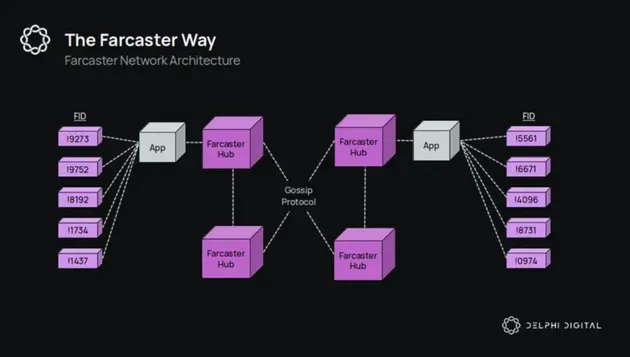
Running your own Farcaster Hub (Hubble) is the difference between renting a room in a crowded apartment complex and owning the building. When you sync through a third-party provider, you are trusting their uptime and their data integrity. When you run Hubble, you control the data. This setup requires a Virtual Private Server (VPS) with enough horsepower to handle the write-heavy nature of social media data.
The Farcaster network is built on Ethereum, meaning every "cast" and "follow" is anchored to the blockchain, but the social graph itself lives in the Hub. If your Hub falls out of sync, you lose access to the most recent social context. For anyone serious about infrastructure or monetization, this reliability is non-negotiable.
We will walk through the deployment process using a standard VPS environment. This guide assumes you have basic command-line comfort and a server running Ubuntu Linux. The goal is to get your node healthy, syncing, and ready to serve your data.
Farcaster Hub is resource-intensive. It requires significant RAM to hold the active social graph in memory and fast SSD storage for the RocksDB database. Aim for at least 16GB of RAM and 2-4 vCPUs. Storage should start at 1TB, but expect it to grow by 10-20GB per month as the network expands. Providers like DigitalOcean, Linode, or Hetzner are common choices, but ensure the instance is in a region with low latency to the Ethereum mainnet for efficient block verification.
Hubble is distributed as a Docker container. Install Docker Engine and Docker Compose on your VPS. This ensures you are running a consistent environment and makes future updates straightforward. You can verify the installation by running docker --version and docker compose version. Most official guides recommend using the latest stable versions of both tools to avoid compatibility issues with the Hub's dependencies.
Create a docker-compose.yml file and an .env file in your project directory. You need to configure the RPC_URL to point to a reliable Ethereum node (like Infura, Alchemy, or your own Geth node). You will also need to set the NETWORK_ID to mainnet. Crucially, define the GATEWAY_KEY if you plan to expose your Hub as a gateway for other clients, though this is optional for initial setup. This configuration file is your blueprint; get it right before launching.
Run docker compose up -d to start the container in detached mode. Hubble will begin downloading the entire Farcaster history from genesis. This process can take several hours depending on your network speed and hardware. Monitor the logs with docker compose logs -f. The Hub will report its current latestBlock and hubId. Once it catches up to the latest Ethereum block, it is considered "synced" and ready to serve requests.
Once synced, make a simple HTTP request to your Hub's API endpoint (usually port 2281) to fetch a user profile or recent casts. If you receive valid JSON data, your Hub is operational. You can now point your Farcaster client or script to your Hub's IP address instead of a public gateway. This gives you full ownership of your data stream and ensures no third-party throttling.
The health of your Hub directly impacts your ability to interact with the Farcaster ecosystem. A desynced Hub means missing casts, failed follows, and a broken experience. By following these steps, you establish a reliable foundation for your infrastructure. The initial setup is a one-time cost in time and capital, but the long-term reliability and data sovereignty are worth the effort.
Turn visibility into revenue
Syncing your content across multiple platforms does more than just increase your follower count; it creates a direct pipeline to monetization. The friction between content creation and payment has vanished. When a user encounters your work on Twitter, LinkedIn, or a news aggregator via Farcaster Sync, they are already in a familiar environment. If that environment supports immediate action, the path from "interested" to "paying" becomes remarkably short.
Micro-transactions and tips
The most immediate way to monetize is through direct support. Farcaster natively supports tips in USD-pegged stablecoins like USDC. This removes the need for third-party donation platforms that take a significant cut or require complex wallet setup. A user can tip you directly from their feed without leaving the application.
This works best when your content provides immediate value or entertainment. Think of it as buying a round of drinks at a bar—you are supporting the creator in the moment. Because the transaction is on-chain and instant, the psychological barrier to entry is low. For context, the price of Ethereum (ETH) often influences gas fees and user behavior, so keeping an eye on the broader market helps you understand the economic environment of your audience.
Sponsorships and brand deals
Brands are looking for authentic engagement rather than just passive views. Sync allows you to distribute high-quality content to niche, high-intent audiences on their preferred platforms. When you pitch a sponsorship, you aren't just selling a post; you are selling access to a community that trusts your curation.
Because your content is syndicated, you can offer brands a "one-to-many" distribution deal. Instead of negotiating separate posts for Twitter, LinkedIn, and Farcaster, you create one high-value asset that reaches all of them. This efficiency makes you a more attractive partner for mid-tier brands that want broad reach without the overhead of managing multiple social media accounts.
Frames as interactive products
Farcaster Frames are small, interactive applications that run directly within the social feed. They transform passive scrolling into active participation. You can build frames that sell digital goods, offer premium content, or host mini-games.
For example, a developer might create a frame that allows users to mint a limited-edition NFT or purchase a digital zine directly from a cast. The transaction happens in the same window where the content is viewed. This reduces drop-off rates significantly compared to sending users to an external website. Building these frames is straightforward, with guides available from infrastructure providers like Quicknode to help you get started.
By combining direct tips, efficient sponsorship models, and interactive frames, you can build a diversified income stream that scales with your audience growth. The key is to make every interaction on the platform a potential revenue opportunity.
Essential Gear for Creators
Building a presence on Farcaster requires more than just a wallet; it demands a reliable setup that keeps you online and engaged. Whether you are running a Hubble node to sync your casts or managing high-traffic frames, your hardware needs to be stable. A dedicated VPS or a robust home server ensures your data stays current without relying on third-party uptime guarantees.
For content creation, focus on tools that streamline your workflow across platforms. A multi-port USB hub allows you to connect multiple devices for monitoring, while a quality webcam and microphone are essential if you are producing video casts or live streams. Software-wise, use cross-platform schedulers to maintain consistency on X and other networks while your Farcaster activity runs in the background.


As an Amazon Associate, we may earn from qualifying purchases.
Investing in this gear reduces friction, letting you focus on community building rather than troubleshooting connectivity issues. Reliable tools mean you can post consistently, which is the only way to build real traction in the decentralized social landscape.
Farcaster Sync FAQ
Navigating Farcaster’s decentralized infrastructure requires understanding its core mechanics. Whether you are syncing data, verifying identity, or building community channels, these answers address the most common setup questions.
No comments yet. Be the first to share your thoughts!