What Farcaster Sync Actually Means
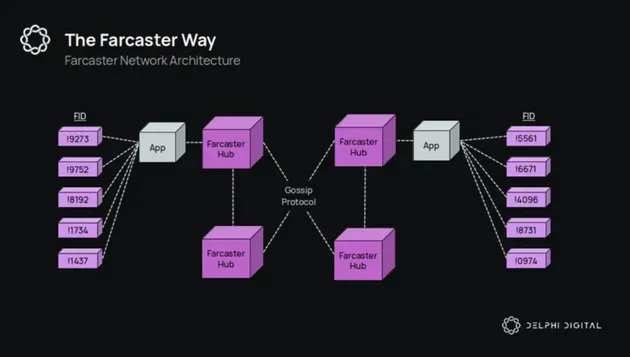
In the Farcaster ecosystem, "sync" is not a user-facing feature toggle or a simple refresh button. It is the underlying mechanism of data replication and state consistency across a decentralized network. Unlike centralized platforms where a single server dictates the truth, Farcaster relies on a distributed set of nodes to agree on the current state of the social graph.
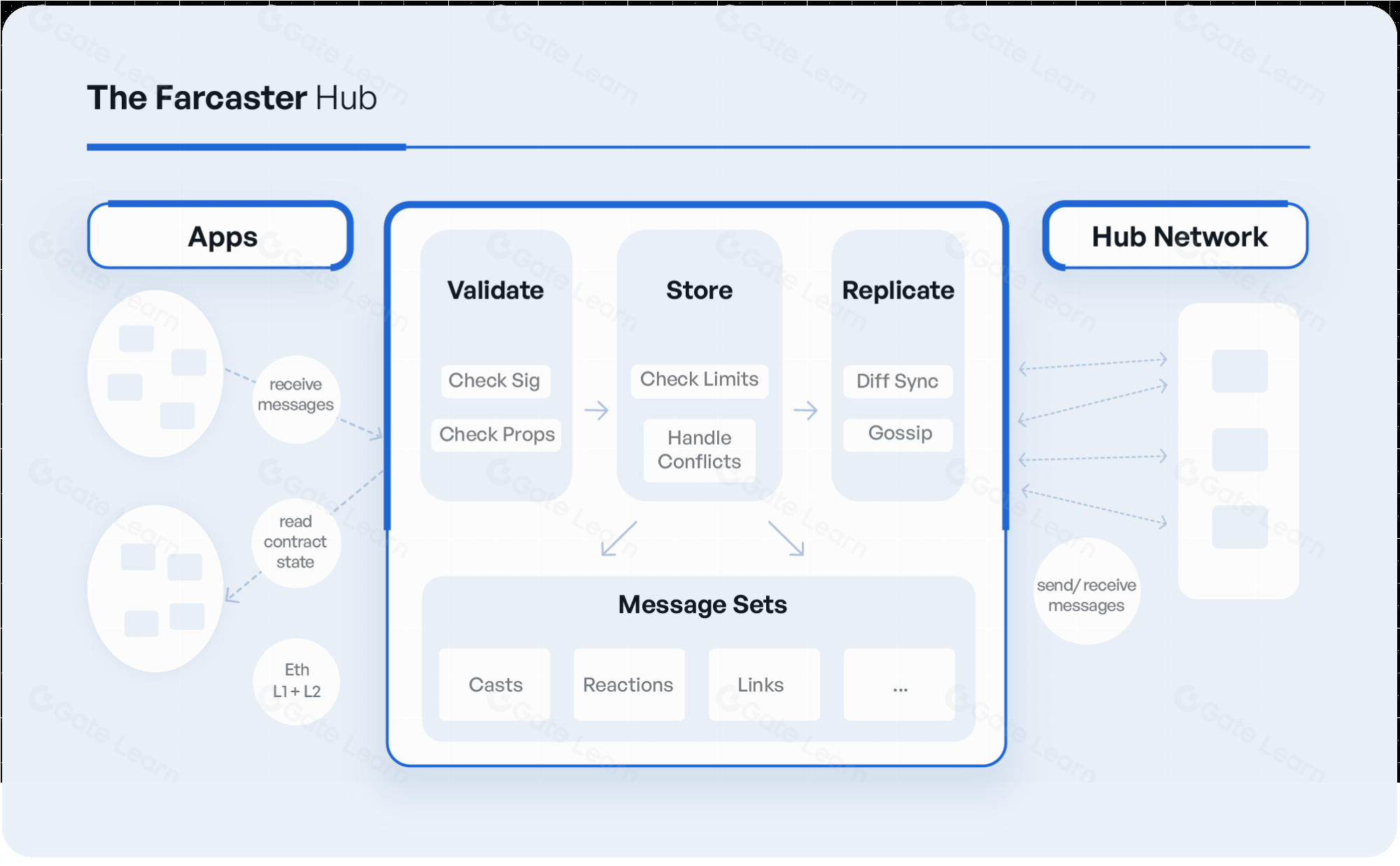
When you post a cast or update your profile, that data is not immediately visible to everyone. It must be propagated from your client to a designated Hub node, which then replicates that event to other Hubs. This process ensures that every participant in the network sees the same timeline, regardless of which client they use. If the sync process lags or fails, you might see stale data or duplicate posts, highlighting the importance of reliable node infrastructure.
This architecture mirrors how email works: you don't own the server, but you control your identity and data. For builders and investors, understanding this sync layer is critical. It determines the reliability of the network, the speed of information propagation, and the resilience against censorship. Without robust sync, Farcaster would be no more than a collection of isolated islands rather than a unified social protocol.
The Farcaster Sync Market Map
Syncing data on Farcaster isn't a single pipe; it's a network of hubs, relays, and indexers. If you are building a client, an agent, or a data dashboard, you need to understand who holds the data and how fast they serve it. The infrastructure is split between the core protocol hubs that validate frames and the third-party indexers that make that data queryable.
At the base layer, the protocol relies on a set of designated hubs. These are the authoritative sources of truth. For most developers, talking directly to the hub set is too slow and expensive. Instead, the market has consolidated around a few major indexer providers who aggregate this data and offer clean APIs.
Key Infrastructure Players
The sync market is dominated by three main providers, each with a different trade-off between latency, cost, and ease of use. Understanding their differences is critical for choosing the right stack for your application.
| Provider | Type | Latency | Integration |
|---|---|---|---|
| HyperSync | Indexer | Low | REST API |
| Neynar | Managed API | Medium | SDK |
| Thirdweb | Infrastructure | Variable | Web3 SDK |
HyperSync acts as a high-performance indexer. It is designed for developers who need to run complex queries on large datasets without hitting rate limits. It syncs data from the hubs and exposes it via a standard REST API, making it a strong choice for data-heavy applications like analytics dashboards or AI agents that need to process historical frames.
Neynar offers a managed API that handles the complexity of hub synchronization for you. It is the go-to option for clients that need reliable, low-maintenance data access. While it may have slightly higher latency than a custom HyperSync instance, the ease of integration via their SDK makes it the standard for many consumer-facing apps.
Thirdweb provides infrastructure tools that bridge the gap between web2 APIs and web3 data. Their approach is more developer-centric, offering SDKs that simplify the process of interacting with Farcaster data within a broader web3 stack. This is often the best fit for teams already using Thirdweb for other blockchain interactions.
The choice between these providers often comes down to your technical resources. If you have the engineering bandwidth to maintain a sync pipeline, HyperSync offers the most control. If you need to ship fast and don't want to manage infrastructure, Neynar is the safer bet. Thirdweb sits in the middle, offering a balance for teams already embedded in the web3 ecosystem.


As an Amazon Associate, we may earn from qualifying purchases.
Core tools for sync and development
Building on Farcaster requires a specific stack that bridges the gap between a standard web app and the decentralized social graph. Unlike traditional social platforms where the backend handles everything, Farcaster puts the heavy lifting on the client. You are responsible for fetching data from the Hub, signing messages with the user’s wallet, and rendering the frame or mini-app within the client’s UI.
The Farcaster SDK and Client Libraries
The primary interface for developers is the Farcaster SDK. This library handles the complex protocol details, such as verifying message signatures and interacting with the Hub nodes. For most builders, the @farcaster/frame-sdk is the starting point. It provides hooks and utilities that simplify state management and user authentication. If you are building a mini-app that needs to live inside the Base App or other clients, this SDK ensures your app behaves correctly across different environments.
Wallet Integration with Wagmi
Since every action on Farcaster requires a cryptographic signature, wallet integration is non-negotiable. The community standard is Wagmi, a set of React hooks for Ethereum. It works seamlessly with the Farcaster SDK to handle user connections and transaction signing. When a user interacts with your frame—whether it’s minting an NFT or casting a message—Wagmi manages the wallet pop-up and confirms the transaction on-chain. This combination of Farcaster SDK and Wagmi creates a robust foundation for any decentralized social application.
Syncing Data with Hub Nodes
Your app doesn’t just send data; it must also sync with the Farcaster network to stay current. This involves connecting to a Hub node, which acts as the source of truth for all casts, reactions, and user profiles. You can use public Hub endpoints for development, but production apps should consider running their own node or using a managed service for reliability. The SDK abstracts much of this networking layer, but understanding the Hub’s role is critical for debugging sync issues.
Migrating to Standard Web Apps
As the ecosystem matures, tools are evolving to make deployment easier. The Base documentation provides a clear path for migrating existing Farcaster mini-apps to standard web apps. This process often involves updating deprecated SDK methods and registering your app on Base.dev. Keeping your dependencies up to date ensures compatibility with the latest client updates and security patches. For builders, this means less time maintaining legacy code and more time building features that users actually want.
Building viral mini apps with sync
Farcaster mini-apps are not just static web pages; they are interactive experiences that live inside the social graph. The secret to virality is real-time interactivity. When a user performs an action, their friends see it instantly. This feedback loop drives engagement and growth.
Sync capabilities allow your app to maintain a shared state across all connected clients. This means if one user votes, updates a leaderboard, or changes a setting, everyone else sees the change immediately. This is the core mechanic behind apps like Farcaster's native polls or community-driven games.
To build these, you need to understand the SDK and how it handles state synchronization. Here is how to get started.
Start by installing the official Farcaster MiniApp SDK. This library provides the necessary hooks to interact with the Farcaster client. It handles the heavy lifting of connecting to the user's wallet and managing the app's lifecycle within the Farcaster environment. You can find the installation instructions in the official Celo documentation.
Once installed, initialize the SDK in your application. You will need to integrate a wallet connector, such as Wagmi, to handle user authentication. This step ensures that the app can identify the user and access their Farcaster account. Proper wallet integration is critical for secure state management and user identity.
This is where the magic happens. Use the SDK's sync methods to update the app's state across all connected clients. When a user makes a change, broadcast that change to the network. Other users' clients will receive the update and reflect it in real-time. This creates the seamless, interactive experience that drives virality.
Finally, test your app's sync performance. Ensure that updates are fast and reliable. Optimize the user experience to encourage sharing and interaction. The faster the sync, the more engaging the app. Use analytics to track user engagement and refine your sync logic for maximum impact.
By following these steps, you can build mini-apps that leverage Farcaster's unique social graph. The key is to make every interaction feel immediate and connected to the wider community.
Strategic Takeaways for Builders
Choosing the right sync infrastructure isn't just a technical decision; it's a product strategy. Your sync layer determines how fast a user sees their social graph update and how much compute you burn per active user. If you're building for longevity, prioritize components that decouple read and write paths, allowing you to scale indexing independently of consensus.
Start by evaluating your data density. If you're building a high-throughput feed, a dedicated indexing layer like HyperSync or a custom Farcaster node with heavy caching will outperform naive RPC polling. For lightweight apps, simple client-side sync via the official Farcaster SDK may suffice, but you'll hit latency walls as your user base grows. Map your expected daily active users (DAU) against the cost of your current sync method early.
Don't treat sync as an afterthought. A fragmented sync strategy leads to inconsistent user experiences, which kills retention in social networks. Whether you use a managed provider or self-host, ensure your infrastructure can handle reorgs and message deduplication gracefully. The goal is to make the decentralized nature of Farcaster feel as seamless as a centralized API to your end users.
No comments yet. Be the first to share your thoughts!