What Farcaster Sync actually does
Farcaster Sync operates as a bridge between X (formerly Twitter) and Farcaster, automating the distribution of your content across both platforms. Instead of manually cross-posting, you connect your accounts, and the tool mirrors your X posts as casts on Farcaster in real time. This automation is particularly valuable for creators who want to maintain a consistent presence across the centralized social graph of X and the decentralized, open protocol of Farcaster without splitting their attention.
The core value proposition is efficiency. By syncing your feed, you ensure that your insights, market analysis, and commentary reach Farcaster’s engaged community of developers and builders without requiring duplicate effort. For financial and tech professionals, this means you can leverage X’s broad reach while simultaneously growing your authority on Farcaster, where deep technical and market discussions thrive.
Compare Farcaster Sync tools
Choosing the right Farcaster Sync infrastructure comes down to balancing cost, speed, and feature depth. The goal is to connect your X account to Farcaster without creating friction for your audience. Below, we break down the leading options to help you pick the right fit for your growth strategy.
Feature breakdown
| Feature | Farcaster Sync (b3dotfun) | AutoXtoFarcaster | Manual/Custom |
|---|---|---|---|
| Cost | Free | Free | Developer time |
| Latency | Near-instant | 1-5 minutes | N/A |
| Media | Images & Video | Text only | Full control |
| Frames | Supported | No | Yes |
The table above highlights why Farcaster Sync is often the preferred choice for creators. It handles media automatically, meaning your X posts with images or videos arrive on Farcaster intact. Other tools often strip this content, leaving you with plain text posts that don't perform as well.
| Tool | Price | Media | Frames |
|---|---|---|---|
| Farcaster Sync | Free | Yes | Yes |
| AutoXtoFarcaster | Free | No | No |
| Custom Script | $0+Dev | Yes | Yes |
Latency and reliability
Speed matters. If you post on X and wait five minutes for it to appear on Farcaster, you might miss the initial engagement window. Farcaster Sync uses a direct integration that posts almost instantly. This near-instant delivery keeps your audience engaged in real-time, which is critical for viral growth.
For high-stakes announcements, you want reliability. Farcaster Sync is built on the Base network, which provides a robust and stable infrastructure. This means fewer failed posts and a smoother experience for you and your followers.
Market context
While the tools themselves are free, the underlying assets they operate on can fluctuate. Keep an eye on the broader market to understand the ecosystem you're building in.
Setting up your sync workflow
Configuring a Farcaster Sync is less about marketing fluff and more about infrastructure integrity. You are building a bridge between two distinct data ecosystems: the centralized, API-gated world of X and the decentralized, hub-based architecture of Farcaster. If the plumbing is leaky, your growth metrics will be misleading. The goal here is to establish a reliable pipeline that preserves data integrity from the moment an X post is captured to the moment it appears as a cast.
1. Secure and validate API credentials
Your sync workflow begins with authentication. You need valid API keys for both X (Twitter) and your chosen Farcaster Hub provider. Treat these keys like private keys for a wallet: if they are exposed or expired, the sync fails immediately. Verify that your X API tier allows for the read volume you anticipate. For Farcaster, ensure your hub connection is stable and that you have the correct fid (Farcaster ID) permissions. A mismatched key here is the most common point of failure for beginners.
2. Select and connect your Farcaster Hub
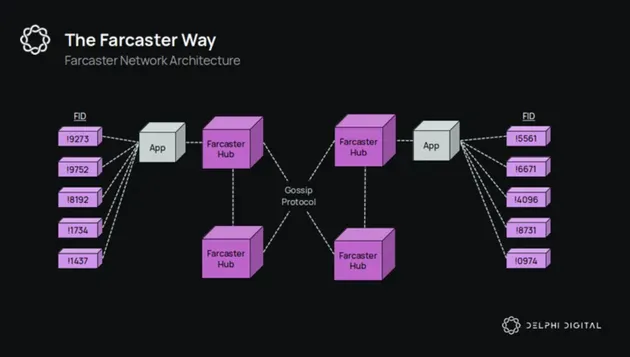
Farcaster does not store data on a single central server; it relies on a network of hubs. You must choose a hub provider (such as Neynar, Supercast, or a self-hosted Hubble instance) and configure your sync tool to point to it. This selection matters because hub latency and indexing quality affect how quickly your synced content appears. Check the hub’s documentation for the specific WebSocket or REST endpoints required for real-time cast ingestion. A robust hub connection ensures that your sync doesn’t drop casts during network congestion.
3. Map your X accounts to Farcaster identities
Define the source-to-destination mapping. Which X accounts should sync? Should all posts mirror, or only those with specific hashtags? Configure the sync tool to filter these inputs. Simultaneously, verify that the target Farcaster account (the fid) is active and has sufficient storage for the incoming casts. This step is critical for data integrity: you don’t want a sync error silently dropping high-value content because the destination account was misconfigured or hit a storage limit.
4. Run a test cycle with controlled data
Before going live, perform a dry run. Post a test tweet on X and monitor the sync tool’s logs. Does the cast appear in Farcaster within the expected latency window? Check the content formatting—links, images, and text should render correctly. This test phase is your only chance to catch API rate limits, hub connectivity issues, or formatting errors before they impact your audience. If the test fails, the logs will tell you exactly where the break occurred.
5. Monitor and alert for failures
A sync workflow is only as good as its monitoring. Set up error alerts for API timeouts, hub disconnections, or failed cast submissions. You need to know immediately if the pipeline breaks, not weeks later when you notice a gap in your social graph. Use your sync tool’s dashboard or integrate with a monitoring service to track success rates. Consistent monitoring ensures that your Farcaster Sync guide implementation remains a growth engine, not a broken link.
Confirm your X API key has the necessary read permissions and check for any rate limit warnings in your dashboard.
Test the WebSocket or REST connection to your chosen hub provider to ensure real-time data streaming is active.
Post a test tweet and verify it appears correctly on Farcaster, checking for formatting errors or missing media.
Configure notifications for API failures, hub disconnections, or sync drops so you can react immediately.
Turn Farcaster Sync traffic into revenue
Syncing your X content to Farcaster is not just about vanity metrics; it is about moving high-intent users toward monetization. While X audiences often scroll past, Farcaster users are accustomed to engaging with onchain-native communities and tools. A Farcaster Sync guide helps you understand how to bridge this gap, turning passive readers into active participants in your ecosystem.
The primary lever for monetization here is trust. Farcaster users verify their identities through wallet signatures, creating a lower noise-to-signal ratio than traditional social media. When you sync your X posts, you are not just reposting text; you are inviting users to verify their identity and join your conversation. This friction is a feature, not a bug. It filters for users who are serious about the topic, whether that is crypto trading, DeFi protocols, or Web3 infrastructure.
To see this opportunity in context, look at the broader market sentiment. The following chart illustrates the volatility and growth potential of the assets often discussed in these high-engagement circles.
Once users are engaged, the path to revenue becomes clear. You can direct traffic to paid communities, offer exclusive onchain assets, or promote your own Farcaster Frames. Unlike X, where algorithm changes can silence your reach overnight, Farcaster gives you direct access to your audience. A Farcaster Sync guide ensures you capture this value by automating the content flow while preserving the unique cultural norms of the network.
The image below outlines a strategic framework for this growth. It visualizes how different channels and tools can be integrated to scale your reach without losing the authenticity that drives conversion.
Ultimately, the goal is to create a flywheel. X provides the broad awareness, while Farcaster provides the deep engagement. By syncing your content, you ensure that every follower on X has a pathway to become a loyal community member. This is where the real value lies: in the transition from audience to community.
Monitor Sync Health and API Limits
Automated posting to X from Farcaster is a high-stakes operation. A single sync failure can leave your audience with fragmented updates or, worse, duplicate posts that damage credibility. Because you are bridging two distinct protocols, reliability depends on constant monitoring of both your API health and your Farcaster hub synchronization status.
Watch for Rate Limits
Both X and Farcaster enforce strict rate limits. Exceeding these thresholds results in temporary blocks or permanent account restrictions. When building your Farcaster Sync guide, you must account for these caps in your posting schedule. If you are automating high-frequency updates, consider batching requests or adding random delays between posts to mimic human behavior and avoid triggering anti-spam filters.
Verify Hub Synchronization
Farcaster data is stored across a decentralized network of hubs. A hub being online does not guarantee it has fully synchronized with the rest of the network. As noted by technical analysts, you must compare your hub against the wider network to verify the sync percentage before relying on it for critical data retrieval. If your hub is lagging, your sync tool may pull outdated or incomplete data, leading to errors in your cross-posted content.
Formatting and Error Handling
Content formatting errors are common when translating between platforms. X has specific character limits and media constraints that differ from Farcaster. Ensure your sync tool can handle these differences gracefully. If a post fails to format correctly, the tool should log the error and skip the post rather than publishing broken content. Regularly check your sync logs to identify recurring issues and adjust your configuration accordingly.
No comments yet. Be the first to share your thoughts!