Why Farcaster Sync Infrastructure Matters
Farcaster treats social media as shared infrastructure rather than a closed platform. Users register onchain identities (FIDs) on OP Mainnet and publish social data like casts and reactions to a decentralized network of nodes called hubs. This architecture ensures that no single entity controls the social graph, but it introduces a critical technical challenge: keeping all those independent nodes in agreement.
Without reliable sync infrastructure, the network fragments. Imagine a group chat where half the participants are reading old messages while the others are already discussing new topics. In Farcaster, this desynchronization means users might see duplicate casts, miss replies, or encounter inconsistent profile data depending on which hub their client connects to. The integrity of the entire protocol rests on the speed and accuracy of how these hubs exchange data.
The solution lies in hub-based synchronization using delta graphs. Instead of retransmitting the entire social graph with every update, hubs exchange only the changes—deltas—since the last known state. This approach minimizes bandwidth and latency, allowing the network to scale. Understanding how this sync mechanism works is essential for anyone building on Farcaster, as it determines how quickly your application reflects the latest activity on the network.
How Hub Synchronization Works
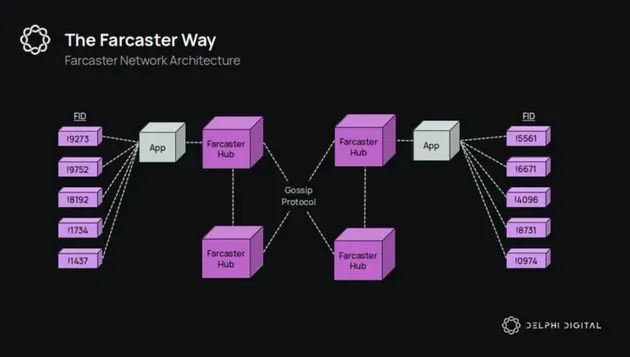
Farcaster operates as a decentralized social graph, but that decentralization relies on a specific, efficient communication protocol between hubs. When a user posts a message, it doesn't just appear everywhere at once. Instead, it starts at one hub, which then pushes that data to its peers. Those peers verify the message and push it further, creating a ripple effect that spreads the data across the network.
This process is driven by a delta-based sync model. Instead of every hub downloading the entire history of the social graph every time they connect, they only exchange the changes—called "deltas." Think of it like version control for social data. Hub A tells Hub B, "I have three new messages from the last hour," and Hub B requests only those three items. This approach drastically reduces bandwidth and storage requirements, allowing the network to scale without requiring every participant to run a massive server.
The synchronization happens peer-to-peer. Hubs are configured with a list of other hubs they trust. When a new message arrives, a hub validates it against the Farcaster protocol rules. If the message is valid, the hub stores it locally and immediately begins forwarding it to its connected peers. This forwarding continues until the message has propagated to the majority of the network. If a hub goes offline, it can catch up by syncing its delta graph with any healthy peer, ensuring data consistency across the entire system.
How Delta Graphs Keep Data Intact
Farcaster doesn’t rely on a single server to hold the truth. Instead, it uses a network of hubs that sync with each other using a system called delta graphs. Think of these graphs as a living map of changes rather than a static database. When a user posts a message or updates their profile, the hub records that change as a small, verifiable packet called a message. These messages are then pushed to other hubs, which verify them against the protocol rules before adding them to their own local graph.
This structure ensures data integrity without requiring every hub to store the entire history of every user from day one. Each hub maintains a subset of the graph, focusing on the users and messages it cares about. When a new hub joins or an existing hub falls behind, it doesn’t need to re-download everything. It only needs to sync the "delta"—the differences between what it has and what the network has. This makes the system lightweight and fast, even as the network grows.
Validating and Propagating Messages
The magic happens in how these messages are structured and validated. Every message on Farcaster is cryptographically signed by the user’s key pair. This signature proves that the message actually came from the user and hasn’t been tampered with. When a hub receives a message, it checks the signature, verifies the timestamp, and ensures the message follows the protocol’s schema. If any part of this check fails, the hub rejects the message.
Once validated, the message is stored locally and immediately propagated to connected hubs. This propagation happens in waves, with hubs sharing their latest known state with each other. This multi-channel sync process ensures that even if one hub goes offline, the message will eventually reach every other hub in the network. The result is a resilient, decentralized system where no single point of failure can disrupt the flow of information.
Running a Farcaster Hub
Running your own hub gives you full control over the data you store and serve, but it requires a solid machine and a stable network. Unlike a simple node that just reads data, a hub is a write-heavy storage engine. It receives messages from users, validates them against the protocol rules, and then syncs with other hubs to keep the graph consistent.
Hardware Requirements
You do not need a supercomputer, but you do need fast storage. The hub writes every new cast, reaction, and profile update to disk. A slow HDD will cause your hub to fall behind the network, leading to sync errors.
- CPU: A modern 2-4 core processor is sufficient. Most of the work is I/O bound, not CPU bound.
- RAM: 8GB is the minimum, but 16GB provides a comfortable buffer for the in-memory state. The hub keeps a working set of user profiles and cast hashes in RAM for fast lookups.
- Storage: This is the bottleneck. Use a fast NVMe SSD. You will need at least 500GB of free space, but expect it to grow by 5-10GB per month depending on network activity. The data is stored in a RocksDB database, which performs best on low-latency storage.
- Network: A dedicated 100Mbps+ connection with a static IP or reliable port forwarding is essential. You need to be reachable by other hubs for sync.
Network Configuration
Your hub needs to talk to the Farcaster network via the farcasterp2p protocol (usually port 2281) and serve data to clients via HTTP/REST or gRPC (usually port 2282). Make sure your firewall allows inbound traffic on these ports. If you are behind a NAT, you will need to configure port forwarding so other hubs can find you.
Delta-Based Sync
The hub does not re-download the entire history every time it restarts. It uses a delta-based sync mechanism. When your hub connects to a peer, it exchanges their latest "root hash" and "timestamp." If the hashes differ, your hub requests only the new messages (the delta) since that point in time. This makes sync incredibly fast, often completing in seconds even after weeks of downtime.
However, if your hub falls too far behind, you may need to perform a "full sync." This involves downloading the entire history from a peer. To avoid this, keep your hub running consistently. If you do need a full sync, you can point your hub to a trusted peer or use a snapshot provider to load the initial state.
Tools for Monitoring Sync Health
Monitoring sync health is critical for maintaining a reliable Farcaster hub. You need to track latency, message propagation times, and peer connectivity to ensure your hub is staying in sync with the network. Tools like fid CLI commands and third-party dashboards provide visibility into these metrics. Regular monitoring helps you identify sync issues before they impact your users or cause your hub to fall behind.
Helpful gear
Use these product recommendations as a starting point, then choose the size, material, and price point that fit how you actually use the gear.
As an Amazon Associate, we may earn from qualifying purchases.
No comments yet. Be the first to share your thoughts!