Farcaster Sync Analysis: Infrastructure and Tools
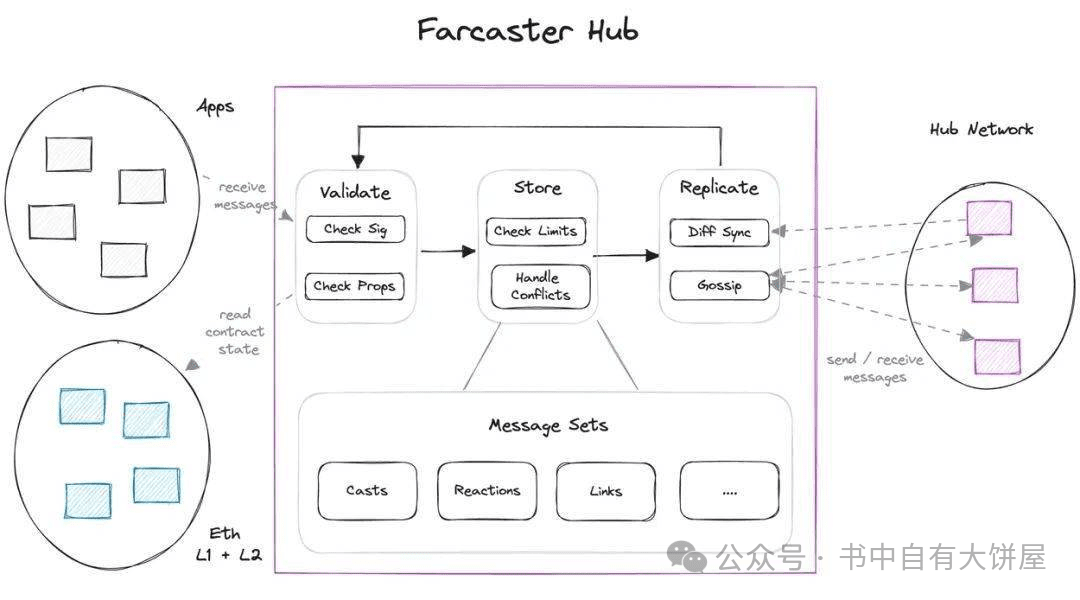
Farcaster operates as a decentralized social graph, but its data isn't stored in a single central database. Instead, it relies on a network of independent servers called Hubs. These Hubs synchronize with one another to maintain a consistent, real-time view of the social graph. For developers and researchers, understanding this synchronization mechanism is critical before attempting to query the network.
The primary challenge in Farcaster sync analysis is managing data consistency across a distributed system. When a user posts a message, it is first sent to a set of Hubs. These Hubs then gossip the message to their peers, creating a chain of propagation. Analyzing this flow requires tools that can track message latency, verify Hub connectivity, and detect potential forks or inconsistencies.
To conduct a proper sync analysis, you need infrastructure that can replicate the Hub protocol locally. This involves running a Hub instance, connecting to the mainnet or a testnet, and monitoring the synchronization process. The goal is to observe how messages propagate, how conflicts are resolved, and how the network maintains integrity under load.
The following sections break down the essential tools and methods for analyzing Farcaster sync performance, focusing on practical implementation and data verification.
Farcaster sync analysis choices that change the plan
Syncing the Farcaster network to a local machine or infrastructure node is a balancing act between data fidelity, latency, and operational cost. Because Farcaster hubs synchronize by receiving messages from peers and broadcasting their own, the sync process is inherently dynamic. User data changes at a rapid pace, meaning your sync strategy must account for real-time propagation delays and storage overhead.
When evaluating sync options, consider the following concrete factors:
| Factor | Local Node Sync | API-First Sync | Hybrid/Cached |
|---|---|---|---|
| Latency | Low (direct network access) | Medium (HTTP round-trips) | Low (cache hit) |
| Storage Overhead | High (full history retention) | None (server-side storage) | Medium (selective caching) |
| Data Freshness | High (near-real-time) | Medium (API refresh rate) | Variable (TTL dependent) |
| Complexity | High (maintenance, upgrades) | Low (library integration) | Medium (cache invalidation) |
Latency and Data Freshness
If your use case requires real-time feed aggregation or immediate message processing, a local node sync offers the lowest latency. You receive messages directly from the network as they propagate, bypassing API rate limits and refresh cycles. However, this comes with the responsibility of maintaining a consistent view of the network state. API-first approaches introduce a slight delay, which may be acceptable for content curation or non-time-sensitive analytics, but can lead to stale data in high-frequency trading or live engagement scenarios.
Storage and Operational Cost
Local sync requires significant disk space to store the full history of frames, casts, and reactions. As the network grows, so does the storage burden. API-first solutions offload this cost to the provider, but you may face rate limits or higher costs for high-volume queries. A hybrid approach, where you cache only the most relevant data or recent history, can reduce storage needs while maintaining reasonable freshness, though it adds complexity in cache invalidation logic.
Network Stability and Peer Dependencies
Farcaster hubs are finding it harder to stay in sync as the network scales. Your sync reliability depends on the health of your peer connections. If your local node loses connectivity with key peers, you may miss messages or experience gaps in your data stream. API providers often have multiple backend nodes and redundancy, offering higher availability at the cost of less transparency. Monitor your peer count and sync lag metrics to detect degradation early.
How to choose your Farcaster sync setup
Syncing Farcaster means running a local node that connects to the network's hubs. This process captures every message—casts, reactions, and profile updates—into a database you control. For creators building monetization tools, this local data is the foundation. It allows for real-time indexing and custom analytics that third-party APIs cannot always provide.
Choosing the right configuration depends on your technical comfort and hardware. You can run a hub directly or use a simplified client. The decision framework below breaks down the three main paths. Each option balances setup complexity against the depth of data access you will have.

This is the most robust option. You run the official farcaster/hub Docker container. It stores the entire history of the Farcaster social graph. This setup requires significant storage (over 1TB for full history) and a stable internet connection. Use this if you need complete data accuracy for financial or heavy analytics applications.
Clients like nemes or reth act as intermediaries. They connect to existing hubs rather than syncing the entire chain from scratch. This reduces storage needs and setup time. It is ideal for developers who want to build applications quickly without managing heavy infrastructure. Data latency may be slightly higher than a full hub.
Providers like Neynar or Supra offer hosted hub endpoints. You pay a subscription fee for data access. This removes all maintenance overhead. It is the fastest route to market for monetization tools. However, you rely on their uptime and data consistency policies. Review their service level agreements carefully before committing.


As an Amazon Associate, we may earn from qualifying purchases.
The best choice depends on your timeline. If you need to launch a creator tool next week, start with a managed service. If you are building a long-term data infrastructure, invest in a full hub. Always test your sync stability with a small subset of data before scaling to full production.
Spotting Weak Options in Farcaster Sync
Syncing Farcaster data often feels like a simple setup, but many tools promise ease they can’t deliver. The network relies on hubs exchanging messages to stay in sync, a process that demands reliable infrastructure. When hubs fail to peer correctly, your data becomes stale or incomplete. You need to verify that your chosen tool handles these peer connections without dropping messages.
Many popular sync solutions ignore the nuances of hub synchronization. They might work initially but fail under load or during network updates. Look for tools that explicitly document their hub interaction strategies. Avoid any option that doesn’t mention how it handles message propagation or hub failures. This distinction separates robust syncs from fragile ones that break when the network shifts.
The real test is consistency. A good sync tool maintains data integrity over time, not just at startup. Check for community reports of downtime or data gaps. Prioritize options with transparent error logging and clear recovery procedures. This practical focus prevents costly data loss and ensures your analysis remains accurate.
No comments yet. Be the first to share your thoughts!