How Farcaster Hub Sync Works
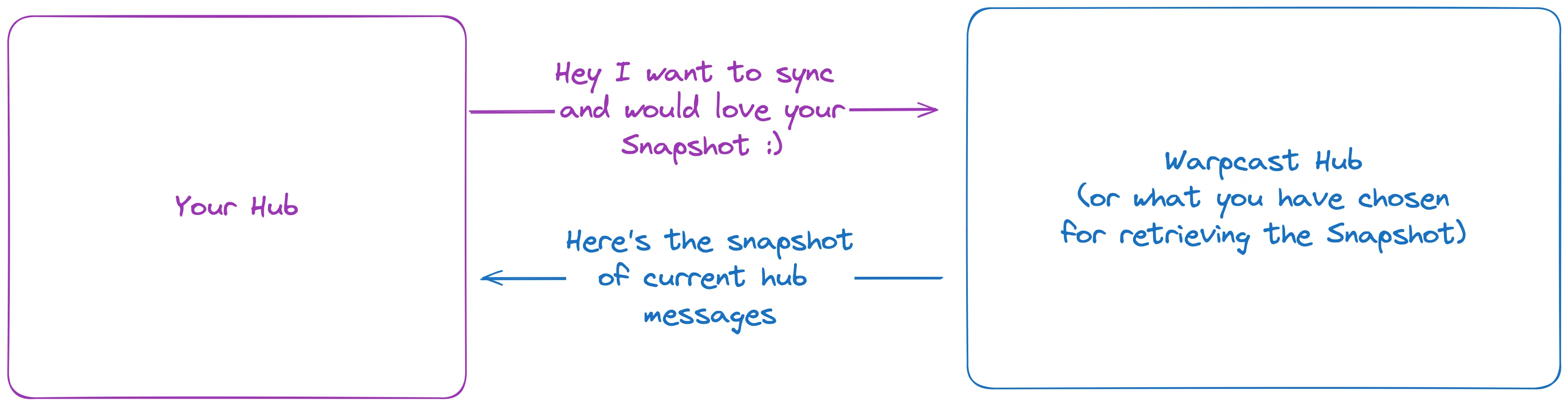
Farcaster Sync is the engine that keeps the network honest. Unlike a simple database backup, this process involves every hub constantly exchanging messages with its peers. When a user posts a cast or a like, that message doesn't just appear everywhere at once. It starts at one hub, which then gossips it to connected neighbors. Those neighbors verify the cryptographic signature against the Ethereum L1 state—ensuring the user actually owns the wallet—and then pass it along. This chain of verification and replication is what makes the data reliable.
The goal of this gossip protocol is eventual consistency. No single hub holds the "truth" initially; instead, the network converges on a shared state as messages propagate. If a hub misses a message, it requests it from a peer that has it. This redundancy ensures that even if one hub goes offline, the data remains available and consistent across the rest of the network. The sync process is continuous, running in the background to keep your local copy of the social graph up to date.
Understanding this mechanism is critical for anyone building on Farcaster. If you are running a hub, you are responsible for maintaining these connections and handling the incoming data efficiently. If you are a developer querying the data, you need to know that the state you see might lag slightly behind the most recent block on Ethereum, but it will eventually match. This sync reliability is the backbone of the entire Farcaster ecosystem, allowing decentralized applications to trust the data they display.
Setting Up Your Sync Infrastructure
Syncing a Farcaster hub is less about complex engineering and more about ensuring your node has enough headroom to handle the network's growing data footprint. While the protocol is decentralized, your local instance needs to be robust enough to process blocks and store casts without choking on I/O or memory constraints. You can get a basic hub running in a couple of hours, but doing it right requires careful attention to hardware specs and configuration. Farcaster is built on Ethereum, meaning your hub will need to interact with the chain for identity verification, adding a layer of complexity that simple social apps don't face.
Hardware Requirements
The baseline for a healthy sync is surprisingly modest, but it leaves little room for error. You need at least 8GB of RAM and 20GB of fast storage to start, though this will fill up quickly as the network grows. If you plan to run additional services like a client API or monitoring tools, you should aim for 16GB of RAM and a dedicated SSD with at least 50GB of free space. Network connectivity should be stable, as dropped connections during the initial sync can corrupt your database.
Software Configuration
Start by cloning the official Farcaster hub repository and installing the necessary dependencies. You'll need to configure your .env file with your Ethereum RPC endpoint and set up the initial database schema. The configuration is straightforward, but missing a single environment variable can cause the sync to fail silently. Check the GitHub repository for the latest setup instructions and ensure your node version matches the supported range.
Initial Sync and Verification
Once configured, launch the hub and watch the logs. The initial sync can take several hours depending on your internet speed and hardware. During this time, the hub will download historical blocks and verify each cast against the Ethereum contract. After the sync completes, verify your node is healthy by checking the /health endpoint and ensuring it reports a connected status to the network. A healthy hub should show consistent block heights and no frequent reorgs.


As an Amazon Associate, we may earn from qualifying purchases.
Common Pitfalls
Avoid running your hub on a system with limited swap space; if the node runs out of memory, it will crash. Also, ensure your firewall allows incoming connections on the required ports, as other nodes need to peer with you to maintain network health. Regularly update your hub software to stay compatible with the latest protocol changes and security patches.
Best Tools for Monitoring Sync Health
Farcaster Sync works best as a sequence, not a scramble through settings. Do the minimum first: confirm compatibility, connect the core hardware, update only when needed, and test the result before adding optional features. That order keeps the task understandable and makes failures easier to isolate. After each step, pause long enough for the interface to finish syncing. Many setup problems are timing problems disguised as configuration problems. If the same step fails twice, record the exact error, restart the smallest affected piece, and retry before moving deeper.
The simplest way to use this section is to keep the setup small, verify each change, and record the stable configuration before adding optional accessories.
Turning Sync Reliability into Revenue
A Farcaster Sync guide is only as valuable as the data it delivers. If your sync pipeline drops frames or lags behind the chain, your monetization tools become unreliable. In the creator economy, a broken frame or a failed tip transaction is enough to lose an audience. Consistent data access is the infrastructure that makes onchain monetization viable, turning technical sync reliability into tangible business outcomes.
Frames as Persistent Monetization Layers
Frames are not just interactive UI elements; they are persistent applications running inside the social feed. A Farcaster Sync guide ensures that the data powering these frames—user balances, subscription status, or content access—remains accurate in real time. When your sync layer is robust, you can build frames that handle complex interactions, such as gating premium content or displaying real-time analytics, without the user experiencing lag or errors. This reliability is what transforms a simple frame into a sustainable revenue stream.
Subscriptions and Recurring Revenue
For creators relying on subscriptions, data consistency is non-negotiable. Your backend needs to verify whether a user’s subscription is active by checking onchain data or verified social signals. A reliable sync infrastructure ensures that these checks happen instantly and accurately. If your sync lags, a subscriber might lose access to content they paid for, or worse, a non-subscriber might gain access due to a data error. By prioritizing sync reliability, you protect your recurring revenue model and maintain trust with your audience.
Tips and Microtransactions
Tips are the most immediate form of onchain monetization, but they also require the lowest latency. When a user sends a tip, the transaction must be confirmed and reflected in your dashboard quickly. A Farcaster Sync guide that optimizes for speed ensures that these microtransactions are processed without delay. This immediacy encourages more frequent engagement, as users know their support is acknowledged instantly. Without this technical foundation, the friction of slow confirmations can stifle the spontaneous generosity that drives tip-based revenue.
Contextualizing Transaction Costs
Understanding the cost of these onchain interactions is critical for both creators and users. High gas fees can deter small tips or subscription payments, making the economics of onchain monetization difficult to scale. Keeping an eye on current market conditions helps you design fee structures that remain attractive to your audience.
Common Sync Mistakes and Fixes
Even with a robust Farcaster Sync guide, infrastructure hiccups are inevitable. When a hub drifts from the network, it usually stems from three culprits: lag, storage bloat, or dropped connections. Here is how to diagnose and fix them.
Lag happens when your hub falls behind the latest epoch. If you see a growing gap in your logs, pause the sync process temporarily. Clear your local message queue to prevent memory overflow, then restart the sync daemon. This allows the hub to catch up in a clean state without dropping messages.
Hubs grow quickly as they store every cast and reaction. If your disk usage exceeds 20GB, you may need to prune old data. Configure your hub to delete messages older than a set threshold, such as 90 days. This keeps the database lean and ensures faster query times for clients.
A disconnected hub cannot sync with peers. Check your firewall settings to ensure ports 2283 and 2284 are open. If using a cloud provider, verify that security groups allow inbound traffic. Restarting the network interface or the sync service often re-establishes the peer-to-peer connection.
For real-time context on network activity, you can monitor related market indicators:
Farcaster Sync FAQ
Syncing a Farcaster hub is the backbone of your node infrastructure. Below are the most common technical questions regarding latency, resource requirements, and reliability.
For the most up-to-date system requirements and installation guides, always refer to the official Farcaster Hub documentation or the Hubble setup guide. These resources provide the definitive steps for configuring your environment.
No comments yet. Be the first to share your thoughts!